
Platform releases 2.1.13 and 2.1.14 went live in quick succession during September 2025, bringing with them a wave of improvements across routing, tracking, and usability. From our brand-new Tarot map tiles to personalised SMS and smarter handling of jobs after midnight 🌙, these updates make every stage of planning and tracking smoother than ever.
New Features
Events & Actions – Bring your own SMS Credentials
You can now send messages via your own Twilio account and give a more personal touch to every message you send. Need Tarot to set this up for you? Reach out and ask about setting up managed numbers and SMS accounts.
Tarot Map Tiles (Default)
Tarot Routing now uses our own custom map tiles by default giving a faster, clearer view that’s optimised for logistics and route planning.
Auto-Generate Barcode Numbers
Automatically create unique barcode numbers when bulk-creating jobs, making it easier to track every unit and delivery if your WMS does not generate barcodes already.
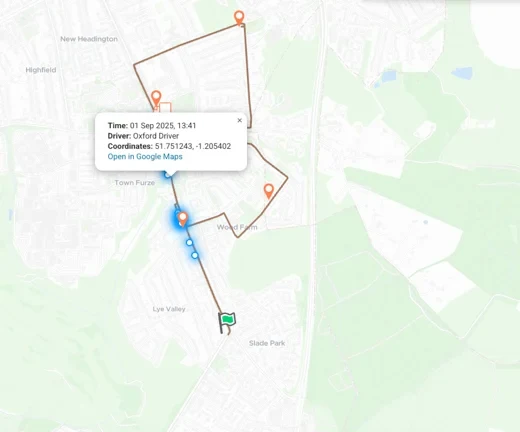
Driver GPS Breadcrumbs
As well as the Driver’s live location you can now see Breadcrumb History. In the Tracking Stage you can expand a Run to show a detailed GPS trace of your the Driver, helping you monitor route accuracy and timing.
Timeline Upgrades
- Toast notifications now show time and distance changes when moving jobs.
- Reverse Run Sequence button — instantly flip a route’s order.
- Drag scrolling makes timeline navigation faster.
- Handle jobs scheduled after midnight correctly (no more broken runs across the day boundary).
Run & Tracking Enhancements
- New Run Detail modal in Routing and Tracking stage.
- The Planned Distance & Time are displayed at the top of the Runs panel.
Design & UI Improvements
- Unit Details modal gives quick access to job and unit information.
- Unified form components across the Map and Admin Panel
- Updated account identification badges for better clarity in Map View
Improvements
- 📸 Checklists & Proofs - Start and End Route Checklists now support multiple images per job.
- Secure password reset process – strengthened security and smoother user flow.
- Performance tuning across background optimisation, job uploads, and tracking link delivery.
Bug Fixes
- 🗺️ Routing & Timeline
- Polylines now update correctly when moving jobs on the map or timeline.
- Re-optimising no longer duplicates runs.
- “Send job to pool” button fixed.
- Timeline error messages when deleting empty runs resolved.
- “Background optimisation” no longer triggers false errors.
- 👷 Admin Panel
- Search Containers page opens correctly.
- Creating new users no longer pre-fills with previous user details.
- Organisation name input fixed during user creation.
- Haulier logo previews now appear immediately after upload.
- Test email and phone fields now save properly.
- 📱 Driver & Job Management
- “Break Time” is now optional, “Address” is required when creating a driver.
- Fixed issue where Job uploads caused client errors.
- Fixed issue where drivers’ flags remained visible after selecting a specific run.
- Scenario date changes now save properly.
- Scenario editing after adding territories no longer fails.
- 🔗 Notifications & Links
- “send_nth_job_in_run_sms” notifications send correctly.
As always, if you’d like help understanding or setting up any of these features — like Twilio credentials, GPS breadcrumb tracking, or Delivery Checklists — reach out to the Tarot Routing team or book a demo.